


LINTEL 2.0 · WORDPRESS LOGIN SECURITY
Strong at the door.
Easy on the way in.
Put a firmer check on every admin login and give members a quicker way in. Then follow sign-ins and file changes from one calm dashboard.
LET PEOPLE SIGN IN WITH ACCOUNTS THEY ALREADY TRUST · FITS THE STACK YOU RUN


Lintel gives admins a firmer second check, members a calmer way in, and you one clear dashboard for every sign-in and each file that changes.
12K+ SITES
★4.8 RATED


Why Lintel?
A single lightweight plugin for guarding logins, watching files and recovering fast, in one place.

Stop it at the door
Passkeys, authenticator codes, attempt limits and address rules keep the wrong people out.

See every attempt
Login logs, email alerts and file checks surface the activity worth a closer look.

Recover without panic
End sessions, force password resets and put a changed file back, quickly.
Every layer your
login needs
Guard each sign-in, see the activity that matters and give members a smoother way through.
Sign-in gates.















Alerts & recaps.


Two-factor by role.


Activity & audit logs.






Social login & magic links.



Wondering where to begin?
Start with the accounts that can change the most. Our first-day guide takes you through each step.
Your site. Your records.


How a login
gets checked
Five checks, in the same order, every single time. The only thing that changes is who’s at the door.

Address check
Blocked addresses stop here, and chosen roles may only come from allowed ones.
Attempt limit
Too many failures in your time window, per address and per account.


Password
WordPress checks it the usual way. Lintel leaves this step untouched.
Second factor
A passkey, app code or emailed code, for every role that requires one.


Logged
Saved to the log, flagged if needed, then sent to the right page for that role.
New in Lintel 2.0




Find out what needs fixing first.
Spot weak settings, exposed files and risky accounts. Every finding says why it matters and what to do next, in plain words.
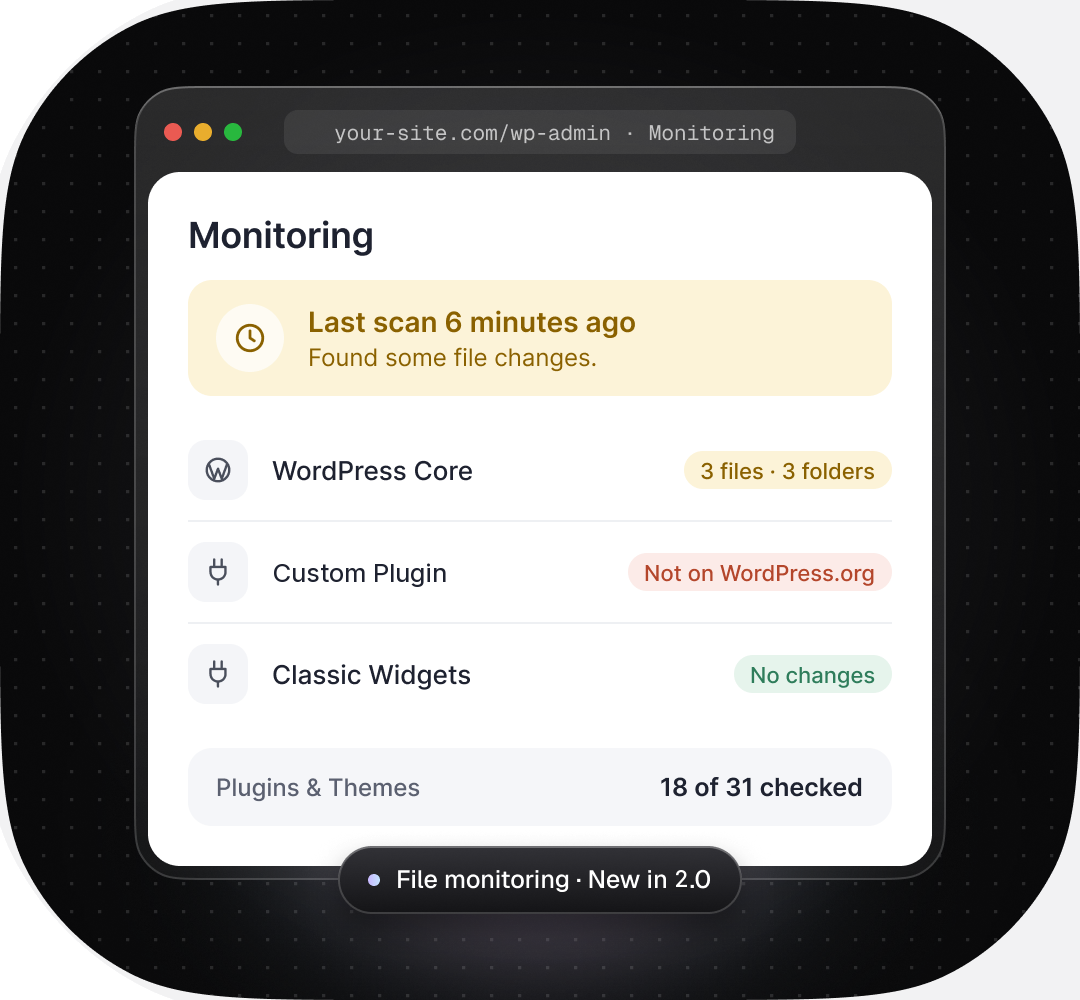
See the moment files change.
Check core, plugin and theme files against official WordPress.org releases. Inspect each difference before you restore a file, and snapshot your custom code too.
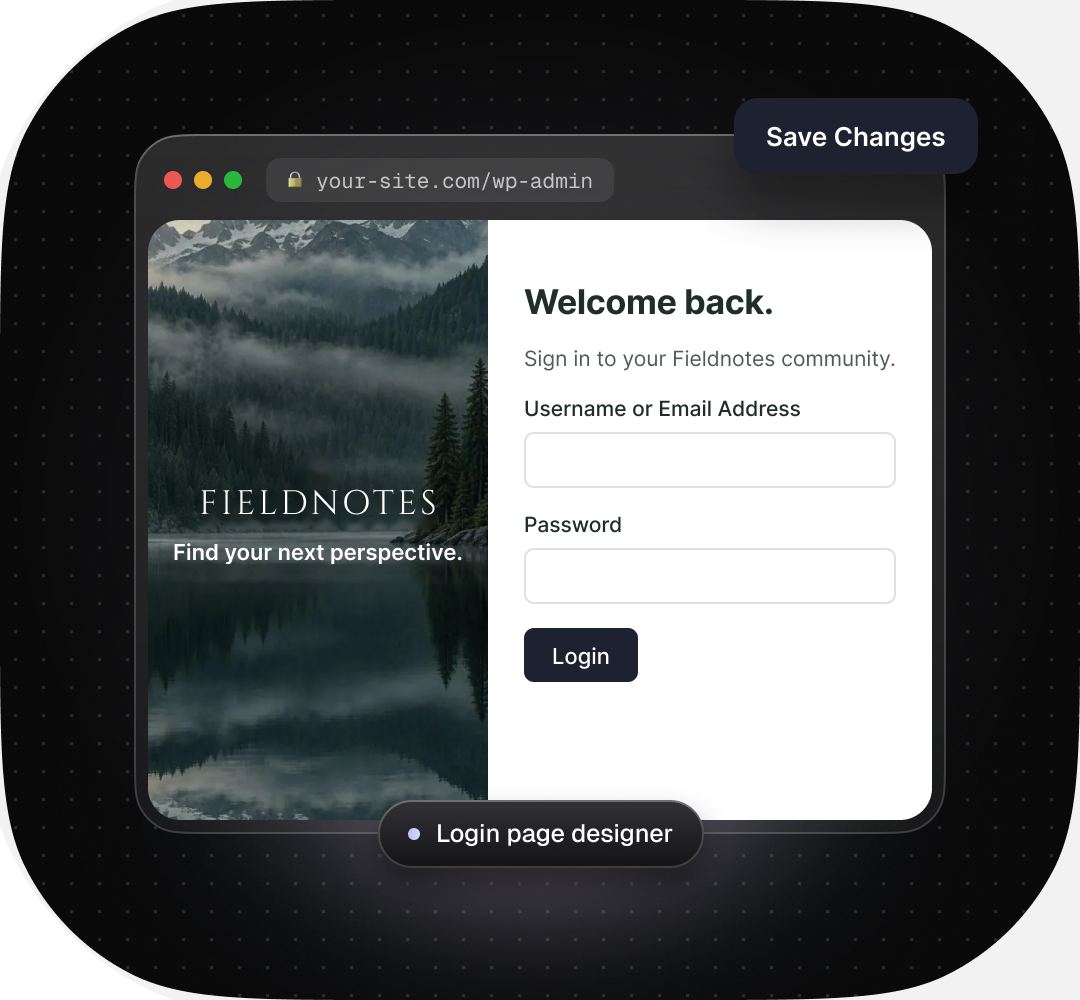
Make sign-in look like you.
Add your logo, colors and a welcome line. Shape the login and signup screens in a live preview, then route each role to its own page after sign-in.
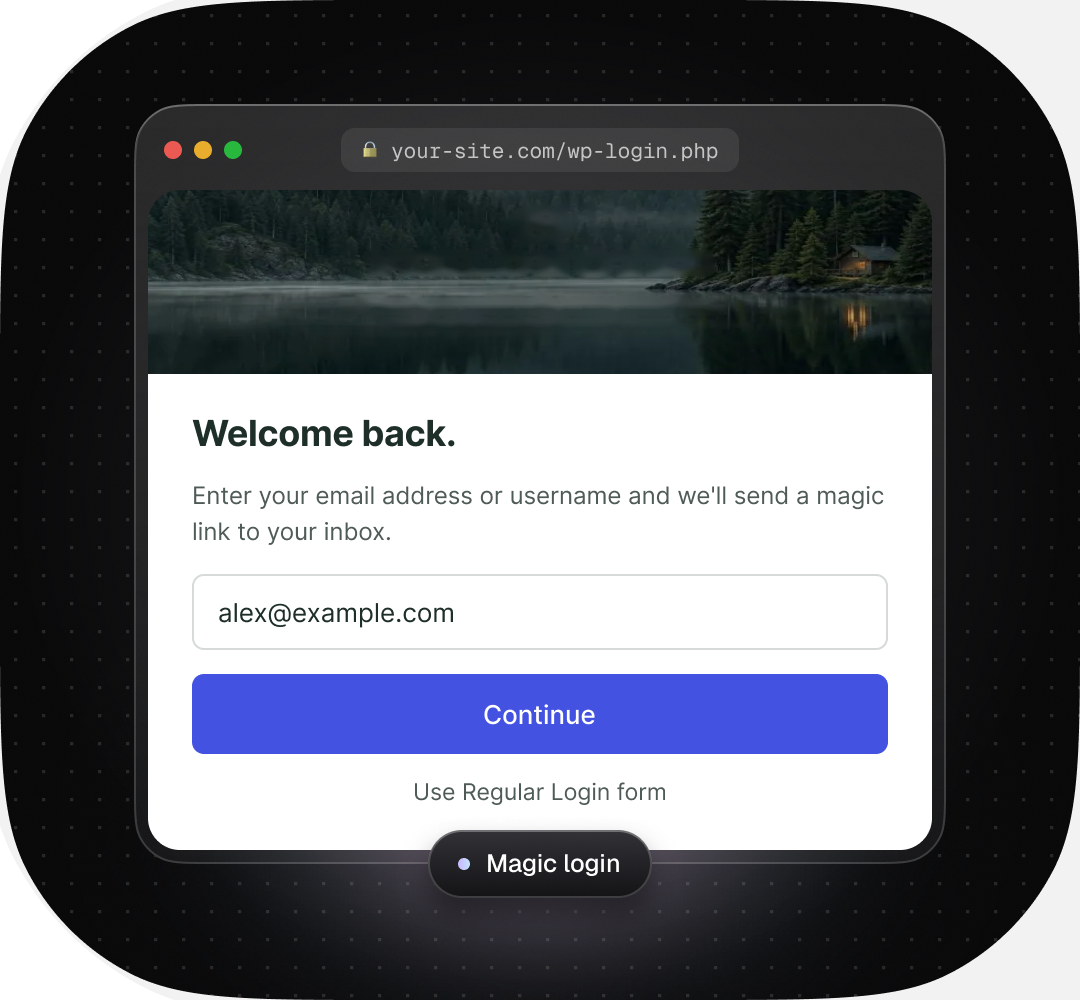
Fewer password headaches.
Members can pick Google, GitHub or Facebook, or ask for a one-time magic link by email. Roles that need it still verify their device.

In their own words
Sample reviews written for this concept site, covering daily use, support and speed.




At last.
I wanted login protection that stays out of the way, and this is it. No upsell banners, no slowdown, just a calm settings screen and a site that feels locked down.
Simple setup, real results
Every login form needs a limit on guessing. Lintel handled that in minutes, and the logs show it working.
Hard to believe something this polished is free.
Clear, dependable protection for the client sites I look after. I’d point anyone who wants straightforward WordPress login security here first.
Light and calm
What I like most is how little it asks of me. The team answers support questions quickly, and the docs actually match what’s on screen.
Solid plugin, kind support.
The plugin is excellent. Better still was the help I got when I asked a setup question.

Alerts I actually read
The email alerts arrive fast and tell me exactly what happened.

Asked and
answered.
Quick answers about price, setup, speed and what to do when a login goes wrong.
Didn’t find your answer?
Ask in the community help forum or work through the troubleshooting guide.
What does Lintel cost, and is a Pro plan on the way?
Nothing. Every feature on this page is part of the free, GPL-licensed plugin, with no site limit. If a Pro plan ever arrives, it will add new tools. What you see here stays free.
Does Lintel replace a full security suite, or work beside one?
Lintel focuses on the login: who gets in, how they prove it and what happened next. It also watches your files for changes. It has no firewall or malware cleanup, so run it beside a suite if you need those.
Which protections should I switch on first?
Start with the accounts that can change the most. Require a passkey or authenticator app for administrators, set an attempt limit, then run the security checklist and fix anything marked Action needed.
Does it slow my site down?
No. Lintel works on the login screen and in your dashboard, not on the pages visitors read. File scans run on a schedule or when you start one, never on each page view.
Which two-factor methods can I use?
Passkeys, authenticator apps that create time-based codes, and one-time codes sent by email. You decide which methods each role may use and which roles must use one.
Which social logins are supported?
Google, GitHub and Facebook, plus Google One Tap. Members can also skip the password with a one-time magic link sent by email. You can switch each option on or off, and roles that need extra proof still verify their device.
What if I end up locking myself out?
Lockouts are timed, so the block lifts once the window you set has passed. If you can’t wait, rename the lintel folder in wp-content/plugins using your host’s file manager or FTP. That switches Lintel off and you can sign in as usual.
Does Lintel move or hide the wp-login.php page?
No. Your login stays at its usual address, so bookmarks, apps and integrations keep working. Lintel protects the page with checks instead of hiding it, which keeps things predictable for everyone.

Build a firmer
front door.
Install Lintel, pick the protections each role needs and give everyone a safer way in. Run it all from one dashboard.
Free · GPL licensed · no account needed
Fresh tips, straight to your inbox
Practical WordPress login-security tips, Lintel release notes and new articles. One or two emails a month.
No spam, never sold. Leave in one click.